Multilingual Support Videos: How to Reach Global Audiences with AI Voices

If your product is available in multiple countries but your support videos only speak one language, you're already losing customers you worked hard to acquire.
According to ICMI, 74% of consumers are more likely to continue purchasing from a brand that provides post-sales support in their language. For global teams, that number doesn't show up in your marketing data — it shows up in your renewal rate.
Multilingual support is no longer a "nice to have" — it's a strategic advantage. With WowTo AI, creating support videos in 20+ languages using natural-sounding AI voiceovers is no longer a six-figure localization project. It's something your team can start doing today.
This guide breaks down how to build a multilingual support experience that scales with your global audience.
Why Multilingual Support Videos are a game-changer
Language is the biggest friction point in global customer support. When customers can't understand your onboarding videos, your help center might as well not exist.
Multilingual support videos solve this by reducing live support dependency — when customers can self-serve in their language, your team fields fewer tickets. They accelerate onboarding, since users who understand a product from day one are faster to adopt it and less likely to churn. They improve satisfaction scores because native-language content feels personal, and customers respond positively. And they allow you to scale without headcount — a single how-to video, once localized with AI voice, can serve thousands of users across dozens of markets simultaneously.
Already thinking about reducing support costs? See how customer service videos can cut your support costs — and what multilingual support adds to that equation.
The old way vs. the AI way: video localization evolved
Not long ago, creating multilingual support videos meant hiring translators, booking voiceover studios, coordinating multiple recordings, editing timings, and syncing audio tracks across every language variant. For a 10-video help center in 5 languages, you were looking at weeks of work and thousands of dollars.
Here's how that stacks up against AI-powered video localization today:
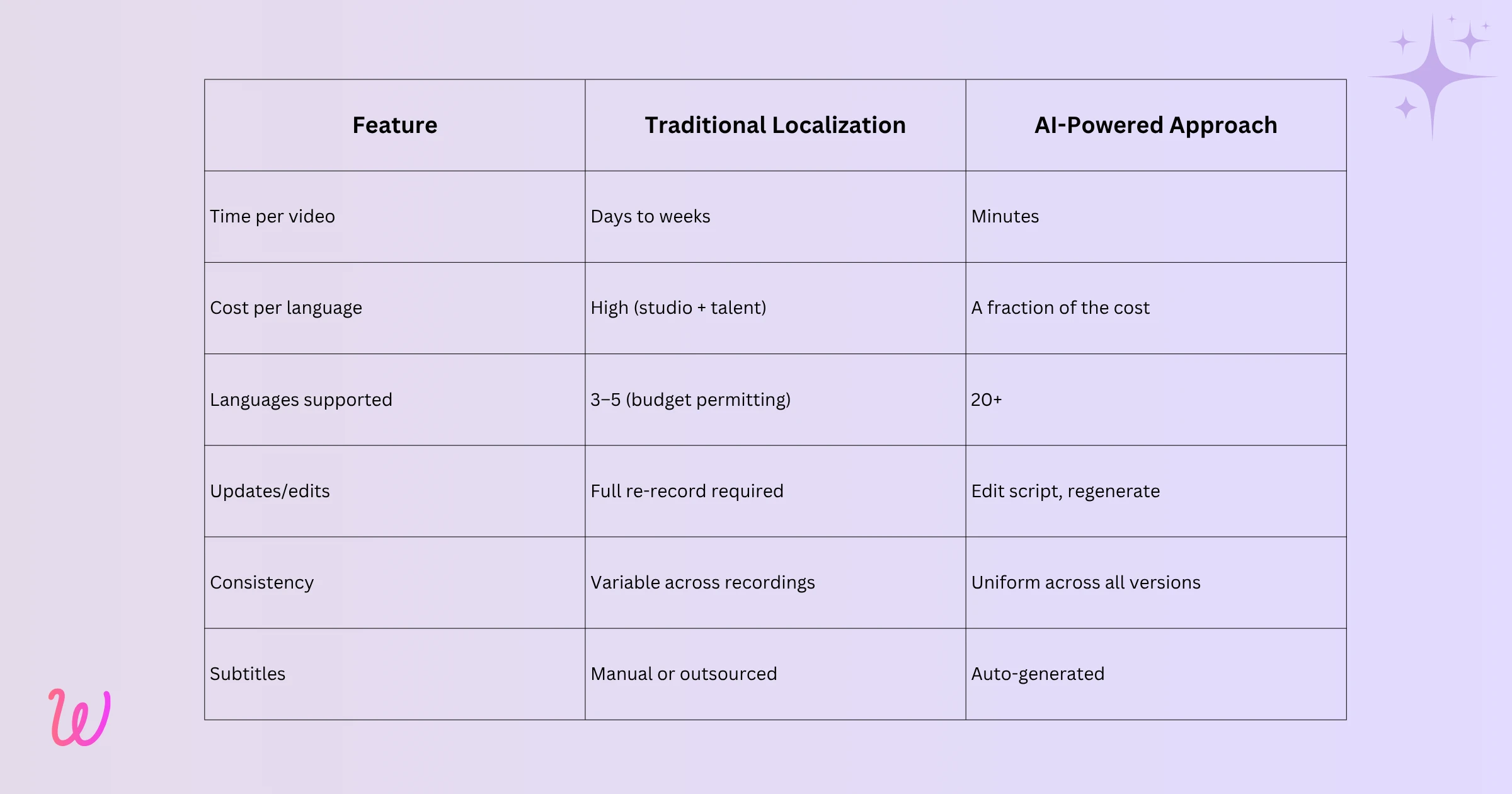
AI voice technology has completely inverted the economics of video localization. What used to require a production team can now be handled by a single customer success manager or L&D specialist — no recording studio required.
Key benefits of AI-powered Multilingual Support Videos
1. Instant localization without a production team
AI voice tools allow you to write a script once and generate voiceovers in 20+ languages with natural-sounding delivery. No re-recording, no coordinating global contractors, no studio bookings. Just select a language, choose an AI voice, and render — in minutes.
2. Consistent brand voice across every language
When you use AI voice, every version of your support video maintains the same pacing, tone, and clarity — whether your customer is in Toronto, Tokyo, or Turin. There's no variation from studio to studio or contractor to contractor. Your brand sounds like your brand, everywhere.
3. Dialect and regional accuracy
Good multilingual support goes beyond translation. It requires dialect choices — the difference between Spanish for Spain and Spanish for Mexico, or French for France and French for Canada. AI voice platforms with dialect options ensure your content feels native, not just translated. Customers in different regions pick up on this, and it builds trust. Scaling instructional videos with AI covers how dialect accuracy fits into a broader localization workflow.
4. Auto-Generated subtitles in every language
Multilingual support isn't just about audio. Subtitles and closed captions expand accessibility for users with hearing impairments and those who prefer to read along — which is a surprisingly large portion of your audience. AI video platforms generate subtitles automatically as part of the production workflow, so every language version ships with captions from day one.
5. Dramatically lower localization costs
Traditional localization is expensive: voice talent, studio time, project coordination, and revision rounds add up fast. AI voice eliminates most of that cost. Teams that previously could afford to localize into 2 or 3 languages can now cover 10, 15, or 20+ markets with the same budget.
6. Faster time-to-market for new languages
When you expand into a new region, your support content needs to be ready on day one — not six weeks later when the translation project wraps. AI voice means you can produce a fully localized support video library for a new language in the same session you create the original. Launch-ready, globally.
7. Edit once, update all languages
Products change constantly. Features get updated, workflows evolve, UI shifts. With traditional localization, a single product update could trigger a full re-recording cycle across every language. With AI voice, you edit the script and regenerate — every language version updates in minutes, not weeks.
8. Reduced support ticket volume across all markets
When customers can find accurate, native-language video answers to their questions, they stop opening tickets. The impact compounds across markets — a support video in Japanese helping 500 users a month means 500 fewer tickets that don't need human handling. Multiply that across every language you support, and the ROI becomes very clear. If you want a more detailed breakdown of the numbers, saving 30% on customer support costs with video tutorials puts it in concrete terms.
9. Higher customer satisfaction and retention
Customers who feel supported in their own language are more satisfied, more loyal, and less likely to churn. Native-language support content signals that your company genuinely cares about the customer experience — not just in your home market, but everywhere. This is a measurable driver of NPS and retention.
10. Scalable self-service for global teams
For companies with multilingual internal teams — distributed workforces, international offices, remote employees across time zones — multilingual support videos mean everyone gets the same quality of training and documentation, regardless of where they're located or what language they speak. How to reduce employee onboarding time with automated video training shows exactly how this plays out in practice.
What to look for in an AI Multilingual Support Video tool
Not all AI video platforms handle multilingual support equally. When evaluating your options, these are the capabilities that actually matter:
A large voice and language library
The more voices and languages available, the more markets you can serve. Look for platforms that offer 20+ languages with dialect choices — not just broad language support, but regional variants that make content feel genuinely local. WowTo's library of 300+ AI voices gives your team the flexibility to match voice tone and style to your specific audience.
Video translation is built into the workflow
WowTo's Chrome extension lets you capture step-by-step workflows inside your browser and converts them into polished how-to videos automatically. Once ready, translation isn't a separate step — generate localized versions that preserve the original structure, timing, and visuals while swapping in new-language audio. From capture to localization, it all happens in one place.
AI avatars for human connection
For customer-facing support videos, an AI avatar adds a visual human presence that plain voiceover can't replicate. It makes instructions feel conversational, builds trust with international audiences, and improves engagement — especially for users who are less familiar with your product.
Automatic subtitle generation
Every language version should ship with subtitles without additional manual effort. This covers accessibility requirements, improves comprehension for non-native speakers, and broadens the reach of your content across different viewing contexts.
A hosted knowledge base for multilingual content
Creating videos is only half the job. You need a place to organize and surface them. WowTo's video knowledge base supports multilingual content, letting customers find help in their language without friction. Hosting on your own domain also helps with SEO — multilingual video content indexed under your domain drives non-English search traffic directly to your support experience.
In-App embedding
The most effective support video is the one that appears at the exact moment a user needs it, inside the product itself. WowTo's embeddable widget makes multilingual support videos accessible without users ever leaving your app.
Easy editing without re-recording
Products change. The tool you choose should let you update a script and regenerate the audio across all languages — without starting from scratch. This is what makes multilingual support sustainable long-term.
Best Practices for Multilingual Support Videos
Having the right tool is only half of it. How your team approaches the process determines whether your multilingual support library actually reduces tickets and drives adoption — or becomes another set of videos nobody watches. These ten best practices separate teams that scale successfully from those that don't.
- Audit before you create: Before recording anything new, look at your existing English support content and cross-reference it with support ticket data by market. The videos that already get the most views from non-English regions — or that correspond to your highest-volume ticket topics in those markets — are your starting point. Localizing what already works is faster and has a higher ROI than building from scratch.
- Define your markets and dialects upfront: Know exactly which languages and regional variants you're producing for before you start. Mexican Spanish and Castilian Spanish are not interchangeable — and neither are Brazilian Portuguese and European Portuguese. Making dialect decisions at the start prevents inconsistent voice choices and avoids the cost of reworking audio after the fact.
- Write the master script first: Your script is the source for every language version you generate. Treat it accordingly. Write it before recording, keep it jargon-free, and have it reviewed for clarity before localizing. One hour of investment in a clean master script saves rework across every market you're producing for. If you're new to scripting support videos, how to create an effective how-to video script walks through the process step by step.
- Scope each video to one workflow: The most effective support videos are tightly focused — one feature, one process, one question answered. Shorter, scoped videos are easier for customers to find and act on, easier for your team to update when the product changes, and easier to localize cleanly without timing or pacing issues across languages.
- Always choose dialect-specific voices: A customer in Mexico hearing Castilian Spanish, or a user in Quebec hearing French from France, will notice — and it subtly signals that the content wasn't really made for them. Always select the dialect that matches the specific market you're targeting. Tools like WowTo give you the granularity to get this right for every region.
- Review every language version before publishing: Check audio quality, subtitle accuracy, and timing in each language before anything goes live. Ideally, have a native speaker or regional team member do a final pass on the script before you generate audio — catching cultural nuance and terminology issues at the script stage is far cheaper than correcting a published video.
- Enable subtitles and embed in-app by default. Two things should be non-negotiable for every support video you publish: subtitles on and in-app embedding configured. Subtitles improve comprehension across all markets and help in watch contexts where audio isn't possible. In-app embedding — set to surface the correct language based on user locale — is consistently the highest-engagement placement for support content.
- Tie the video updates to your release cycle. The moment your product changes, any support video covering that feature becomes a liability. Make updating your support videos a standard item on your release checklist — edit the master script, regenerate the audio, and ensure all language versions are current before the update goes live. This is what keeps your multilingual library accurate at scale without requiring a dedicated localization team.
- Track performance by language, not just overall. Overall engagement numbers can mask underperformance in specific markets. Review analytics by language version alongside your support ticket volume by market. If a version is live but tickets in that region haven't dropped, the video may need to be repositioned, retitled, or revised. WowTo's analytics make it straightforward to catch these gaps before they compound.
- Expand systematically, not all at once. Trying to localize your entire support library into every language at once is how multilingual projects stall. Start with your top five support workflows in your top three non-English markets, get those performing well, then expand from there. A smaller, well-maintained library consistently outperforms a large one that's out of date.
Real-World Use Cases for Multilingual Support Videos
- Global SaaS companies: A SaaS platform with users in 15 countries produces support videos in English, German, French, Spanish, and Japanese. The customer success team creates one workflow video, localizes it to all five languages in a single session, and embeds each version in the in-app widget — surfacing the right language based on user locale.
- E-Commerce platforms: An e-commerce company creates multilingual product setup guides and return process walkthroughs, hosted in a branded knowledge base and linked from post-purchase emails. Result: fewer "how do I…" support tickets across all markets.
- HR and employee training: A multinational company onboards new hires across four countries using training videos produced in local languages with AI voice — from IT setup guides to compliance walkthroughs — with no coordination with regional offices required.
- Customer education programs: Multilingual video training doesn't just reduce support load — it accelerates time-to-value for international users who get the same quality onboarding as domestic ones. How video training in customer education reduces time-to-value goes deeper into this.
Conclusion
Your product may work the same everywhere, but the customer experience doesn’t if support content is only in one language. Multilingual support videos help customers self-serve in their native language, reduce support requests, and create a better global experience. With AI video tools, you can generate voiceovers in 20+ languages from a simple screen recording and script — making it easy to localize support and reach global users.
Ready to build a multilingual support video library that actually scales? Sign up on WowTo today.
