From SOPs to Training Videos: How to Turn Standard Operating Procedures Into Watchable Content

Most organizations have standard operating procedures sitting in shared drives, printed binders, or buried in email threads. They were created to keep teams aligned and reduce errors. Yet most SOPs fail to do their job — not because they were written poorly, but because almost no one reads them. According to Forrester Research, employees are 75% more likely to watch a video than to read a document, email, or web article, and a well-structured SOP video shows a process in action instead of describing it in isolation.
This guide walks through what an SOP is, why video is the right format for it, how to structure your training videos, and how to build a video knowledge base that your team actually uses.
What is a SOP, and why does it matter for training?
A standard operating procedure — commonly abbreviated as SOP — is a documented set of step-by-step instructions that outlines how a specific task or process should be carried out within an organization. SOPs exist to ensure consistency, reduce the margin for error, and make it possible to replicate quality outcomes regardless of who is doing the work.
In a training and development context, SOPs serve as the foundation for onboarding new hires, cross-training existing employees, and maintaining operational standards during team transitions or growth phases. When a key team member leaves, a strong SOP library is what prevents institutional knowledge from walking out the door with them.
The challenge is that a written SOP, however thorough, requires a reader to interpret instructions in isolation — without seeing the actual workflow, without context, and without the ability to ask a question in the moment. That is a significant limitation when the process being documented involves software navigation, physical tasks, or multi-step decisions that are much easier to show than to describe.
This is precisely why training and development teams are increasingly treating their SOPs not as standalone documents, but as the foundation for video content. The SOP provides the structure and the accuracy; the training video provides the clarity and the engagement.
Why video content outperforms written SOPs
The case for turning SOPs into video content is not about trend-chasing. It is about how people actually process and retain new information, particularly in a work environment where attention is divided, and the margin for error is real.
Written procedures require active reading, interpretation, and mental translation into physical or digital action. Video removes that translation layer. An employee watching a screen recording of a workflow sees exactly which menu to open, which field to fill in, and in what order — with spoken explanation providing context at every step.
There are several practical reasons video outperforms text-only SOPs for training purposes.
- Retention is significantly higher. Watching a demonstration engages both visual and auditory processing, making the information far more memorable than reading alone.
- Employees can learn at their own pace. A training video can be paused, rewound, and replayed as many times as needed — something a written document technically allows but rarely facilitates in practice.
- Complex processes become clearer. Multi-step digital workflows, physical assembly tasks, or decision-based processes that take paragraphs to describe can often be demonstrated in under two minutes of video.
- Access is immediate and consistent. A video stored in a video knowledge base is accessible to every team member, across time zones and locations, at the exact moment they need it — without requiring a manager or colleague to walk them through it.
For training and development videos specifically, the format shift from document to video is not just about preference — it is about whether the training actually works.
How to convert a SOP into a training video: a step-by-step approach
The good news is that if you already have a written SOP, the hard work is largely done. Your SOP already contains the steps, the logic, and the required accuracy. Converting it into a training video is about presenting that content in a format that is easier to absorb and act on. Here is how to do it systematically.
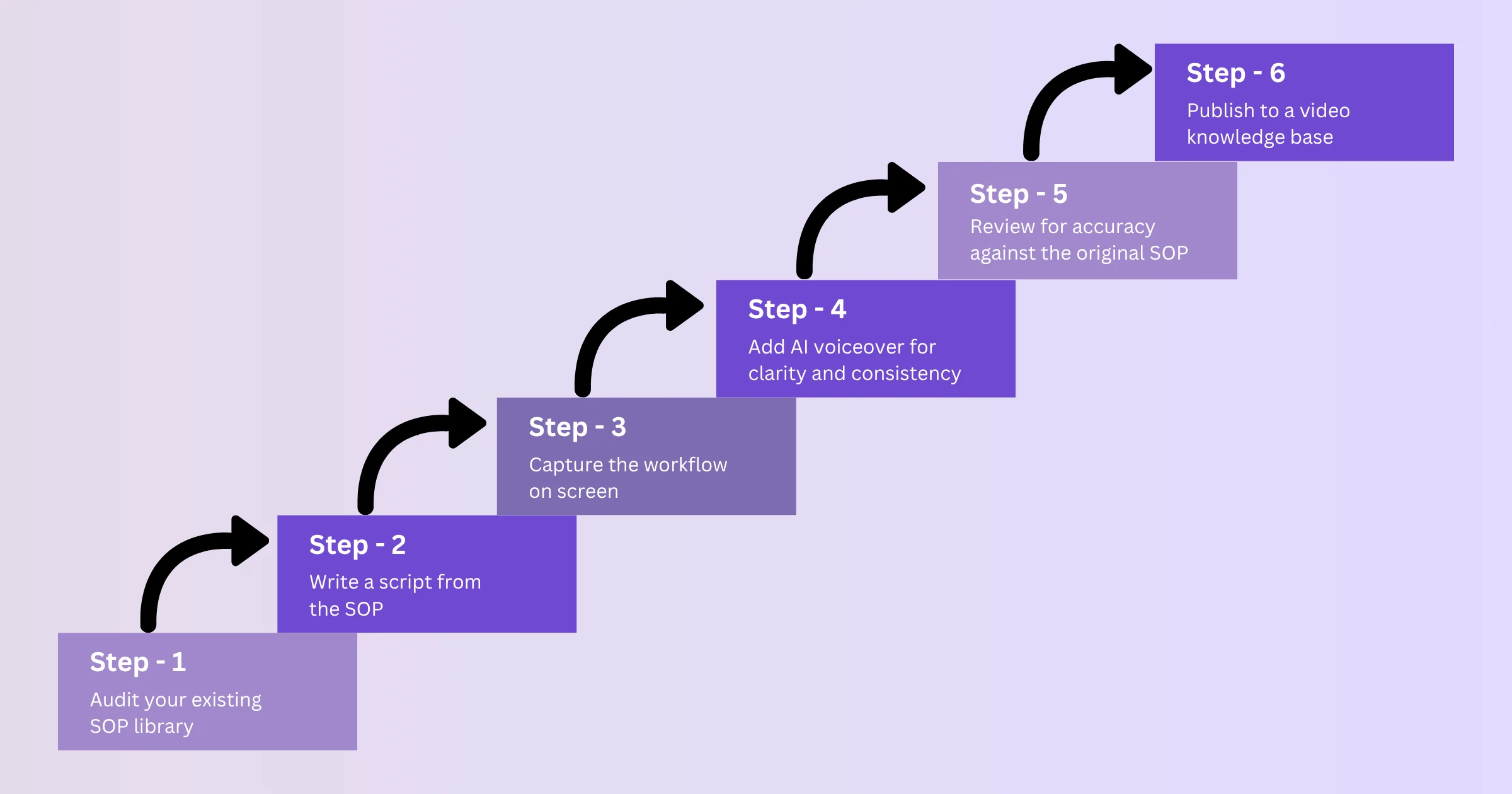
1. Audit your existing SOP library
Start by reviewing what you have. Not every SOP needs to become a video immediately. Prioritize based on two factors: frequency of use and complexity. Processes that are used daily or weekly, and those that involve more than a handful of steps or require digital tool navigation, should move to the top of your conversion list. Simple one-page procedures that rarely change can remain as written documents for now.
2. Write a script from the SOP
A SOP is structured for accuracy; a video script is structured for comprehension. Adapt your SOP content into spoken language — short, clear sentences that work as narration rather than documentation. Remove jargon where possible and replace technical terms with brief explanations. Each step in the SOP should map to a spoken line in the script, and each spoken line should correspond to the visual action being demonstrated on screen. If your SOP already exists as a PDF or PowerPoint deck, WowTo can import it directly and use the slide or page content as the starting point for your script, rather than having you retype it from scratch. If you need more guidance on this process, repurposing existing help docs into how-to videos walks through a similar workflow in detail.
3. Capture the workflow on screen
For digital processes, a screen recording is the most direct and effective way to demonstrate your SOP. The WowTo Chrome extension lets you capture each step of a workflow directly in the browser, automatically breaking the recording into individual steps as you click through the process — so the structure of the video already mirrors the structure of your SOP. If you already have a rough screen recording, you can import it instead and let WowTo convert it into a structured, step-by-step video. Keep each video focused on a single process; trying to cover multiple procedures in one video reduces clarity and makes the content harder to find and use later.
4. Add AI voiceover for clarity and consistency
One of the most common barriers to scaling SOP video production is the recording bottleneck — finding the right person, booking time, managing audio quality, and re-recording whenever processes change. WowTo removes most of this: paste your script in, choose from 300+ AI voiceovers across 20+ languages, and the narration is generated and synced to each step automatically. The result is consistent, professional, and easy to update when the SOP itself changes — you edit the script and regenerate the voiceover instead of re-recording. This is particularly valuable for training and development teams managing large procedure libraries across multiple departments or regions.
5. Review for accuracy against the original SOP
Before publishing, have the relevant subject matter expert — the person who owns the SOP — review the video for accuracy. WowTo's step-by-step editor makes this review easy: each step can be checked, corrected, or re-recorded individually without touching the rest of the video, and sensitive on-screen information can be blurred or annotated where needed. The goal is to confirm that every step shown and narrated matches the approved procedure exactly. This is non-negotiable for compliance-sensitive SOPs, but worth doing for all of them — a training video that contradicts the written SOP creates confusion and undermines trust in both formats.
6. Publish to a video knowledge base
A training video that lives in a folder or an email chain is not a training resource — it is a file. To be useful, SOP videos need to be organized, searchable, and accessible to the right people at the right time. WowTo's video knowledge base builder lets you publish directly from the editor into a categorized, searchable library with access controls, so department-specific SOPs stay visible only to the teams that need them. How to scale your video knowledge base as your product grows covers how to structure this so it stays useful as your library expands.
Structuring training and development videos for maximum impact
Even a perfectly accurate SOP video will underperform if it is not structured well. Here are the principles that make training and development videos genuinely effective.
- One video, one process. Avoid combining multiple procedures into a single video. Each training video should cover exactly one workflow. This makes content easier to find, easier to update, and easier to use in the moment.
- Lead with the outcome. Open every video by stating clearly what the viewer will be able to do by the end. This context helps employees decide whether the video is relevant to their current task.
- Keep it short. The most effective training videos are between 90 seconds and four minutes. Anything longer tends to see a drop-off before the key information is reached.
- Use numbered steps on screen. Where possible, display step numbers visually as well as narrating them. This helps viewers track where they are in the process and return to the right point if they pause.
- End with a clear action. Finish every training video by summarizing what was covered and specifying the next step — whether that is completing the task, accessing a related video, or consulting a document for additional detail.
These principles apply whether you are producing onboarding content, compliance training, software walkthroughs, or process-specific procedure videos. For teams managing high-volume video training, video training for remote and distributed teams provides a framework for maintaining quality at scale.
Building a video knowledge base for your SOP library
Converting your SOPs into video content is only half the job. The other half is making that content organized, searchable, and easy for employees to access without requiring help from a manager or HR team member.
A video knowledge base is a hosted library where all your training and development videos live in one place, organized by category, searchable by title or topic, and accessible with the right level of permissions. For SOP video libraries specifically, a well-structured knowledge base should include the following.
- Clear categorization by department or process type. Group your SOP videos so an employee in operations can find relevant content without sorting through HR onboarding videos.
- Search functionality. Employees looking for a specific procedure should be able to search by keyword and reach the right video in seconds, not minutes.
- Access control. Some SOPs are relevant to the entire organization; others are department-specific or contain sensitive process information. A good video knowledge base lets you control who sees what.
The goal is an environment where any employee, at any time, can find and watch the exact training video they need — without submitting a request, waiting for a scheduled session, or sifting through folders. That is what transforms a library of SOP videos into a genuine self-service training resource.
How WowTo helps teams turn SOPs into training videos
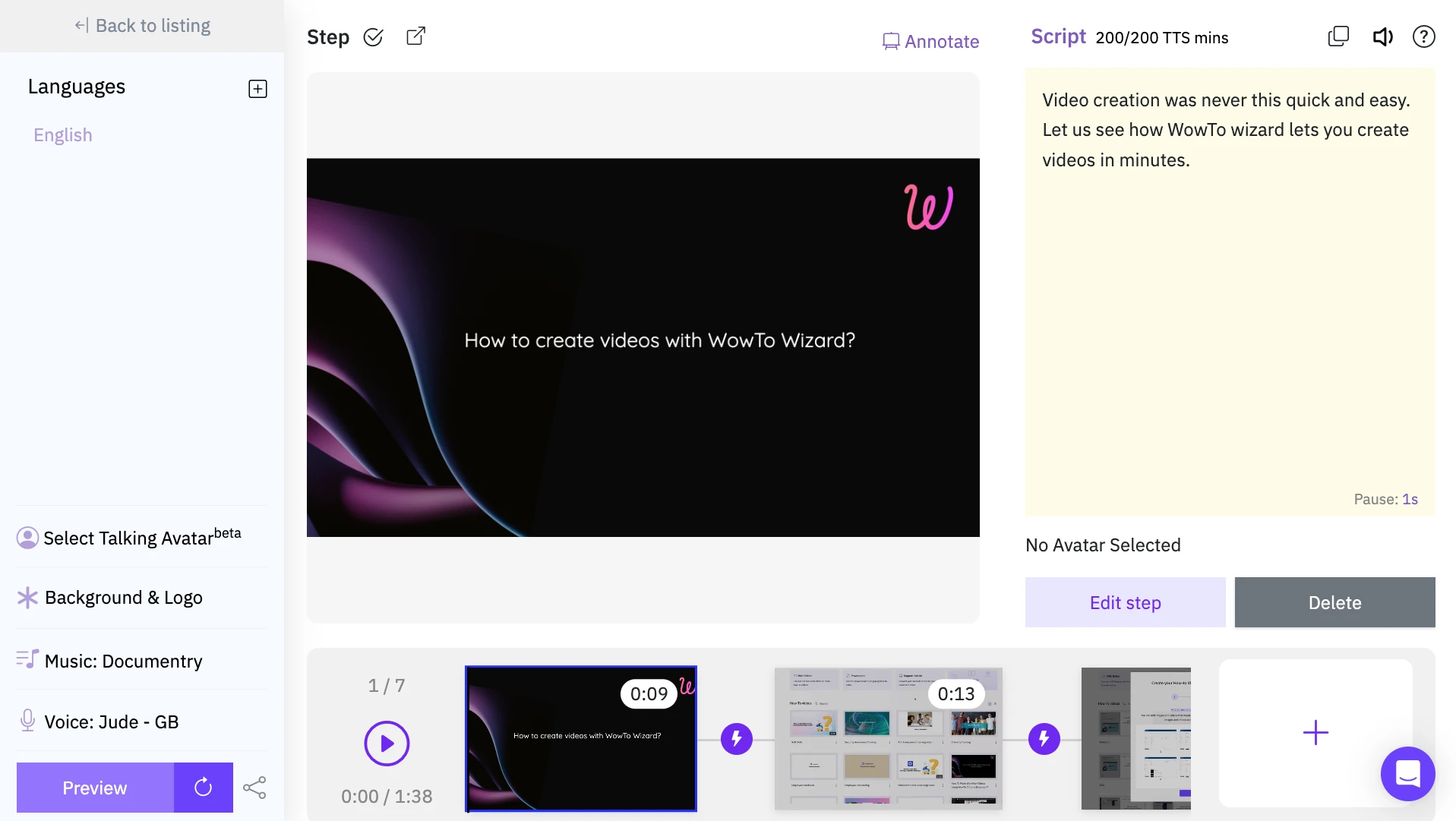
WowTo is a video creation and hosting platform built specifically for teams that need to produce training and support videos without a production team or a complex toolset. It combines a screen recording tool, AI voiceover generation, and a hosted video knowledge base in a single workflow — which means you can go from a written SOP to a published training video without switching between multiple tools or waiting on external resources. For training and development teams managing growing SOP libraries, it removes the production bottleneck that typically slows down video content programs.
Keeping your SOP training videos current
One of the most common objections to investing in SOP video production is maintenance. What happens when the process changes? The concern is valid — outdated training videos are worse than no training videos, because they actively teach the wrong thing.
The solution is to build video updates into the same workflow as SOP updates. When a procedure is revised, the corresponding training video should be flagged for update as part of the same process — not as a separate afterthought. With AI voiceover and screen recording tools, updating a video is a matter of editing the script, re-recording or updating the relevant screen captures, and regenerating the audio. For teams producing large volumes of training videos, the update cost is far lower than teams often expect.
For organizations where employee training and development includes compliance requirements, keeping videos current is not optional. Building an update cadence into your SOP governance process ensures your video knowledge base stays accurate and defensible.
Teams looking to reduce onboarding time and accelerate training impact should also consider how SOP videos integrate into the broader onboarding workflow. How to reduce employee onboarding time with automated video training explores this in practical detail.
Conclusion
A SOP is only as useful as the training it produces. Written procedures that no one reads, filed in folders that no one opens, do not build organizational capability — they just create the appearance of it. Converting your standard operating procedures into structured training videos changes that equation. It takes the accuracy and consistency your SOPs already contain and delivers them in a format that employees actually engage with, retain, and act on.
The path from written SOP to watchable video content is more straightforward than most teams expect. Start by identifying your highest-priority procedures, adapt the content into a clear script, capture the workflow visually, add consistent narration, and organize everything in a video knowledge base your team can access on demand. Then build updates into the same rhythm as your SOP governance process so the library stays current without becoming a maintenance burden.
Your organization has already done the work of documenting how things should be done. Now it is time to turn that documentation into training content that actually works. Start building your SOP video library today — sign up on WowTo for free and create your first training video in minutes.
