When Should You Use an Explainer Video Instead of a Product Demo?
Choosing between an explainer video and a product demo is one of the most common questions marketing, sales, and product teams run into when building a video strategy. Both formats rely on motion, voice, and visuals to communicate value, but they are built for different moments in the buyer journey, and using the wrong one in the wrong place can quietly work against your conversions. It is easy to assume that any video is better than no video, and to reach for whichever format is faster to produce, but the format itself sends a signal to the viewer about how much they are expected to already know.
Video's influence on that journey is well documented: adding a product demo or explainer video to a landing page can lift conversions by as much as 80%, according to Wyzowl's video marketing research. That single number explains why so many teams invest in video, but it does not tell you which video to make or when. This guide breaks down what is an explainer video, what is a product demo, and exactly when each one belongs in your funnel. And if you are mapping out a broader training and development strategy where video plays a role, the same logic in this guide will carry over.
What is an explainer video?
An explainer video is a short, high-level piece of video content, usually somewhere between 60 and 120 seconds, designed to introduce a problem and show how a product or service solves it. Explainer videos rarely walk through an actual interface. Instead, they lean on animation, motion graphics, voiceover, or a mix of live action and text overlays to communicate a concept quickly, before a viewer has decided whether the product is even relevant to them.
The goal of an explainer video is not to teach someone how to use every menu or button. It is to make a visitor understand, within seconds, what a company does, who it is for, and why it matters. Because of that, explainer videos are almost always built around a simple story arc: name the problem, introduce the solution, and end with a clear call to action. You will typically find them on homepages, standalone landing pages, and top-of-funnel ad campaigns, where the audience is still forming a first impression.
Tone and pacing matter more here than technical accuracy, since the viewer has not committed to learning the product yet. Many teams script explainer videos around a single core message rather than a full feature list, on the theory that a confused visitor is far more likely to leave than one who simply wants more detail.
What is a product demo?
A product demo, on the other hand, is a video that shows the actual product in action. Rather than describing a concept in the abstract, it walks a viewer through real screens, real workflows, and real features, often narrated step by step. Demo videos are broadly defined as visual presentations that showcase the features, functionalities, and benefits of a product, giving potential customers a hands-on look before they commit to a purchase.
Product demos tend to run longer than explainer videos, anywhere from two minutes to well over ten, depending on how much of the product needs to be covered and how technical the audience is. They also live further down the funnel than explainer videos, typically appearing on pricing pages, inside free-trial onboarding emails, in a support or knowledge base, or shared directly by a sales rep after a discovery call to answer a specific question.
Accuracy matters more here than polish, since product demos are meant to build confidence rather than curiosity. A demo showing an outdated button layout can undermine trust faster than a plain recording of the current interface, which is why many teams break a long demo into shorter, task-specific videos that are easier to keep accurate as the product changes.
Explainer video vs product demo: the core difference
The simplest way to separate the two formats is by the question each one answers. An explainer video answers, "What problem does this solve, and why should I care?" A product demo answers, "How does this actually work, and can I do my job with it?" Put another way, an explainer video sells an idea, and a product demo sells a workflow.
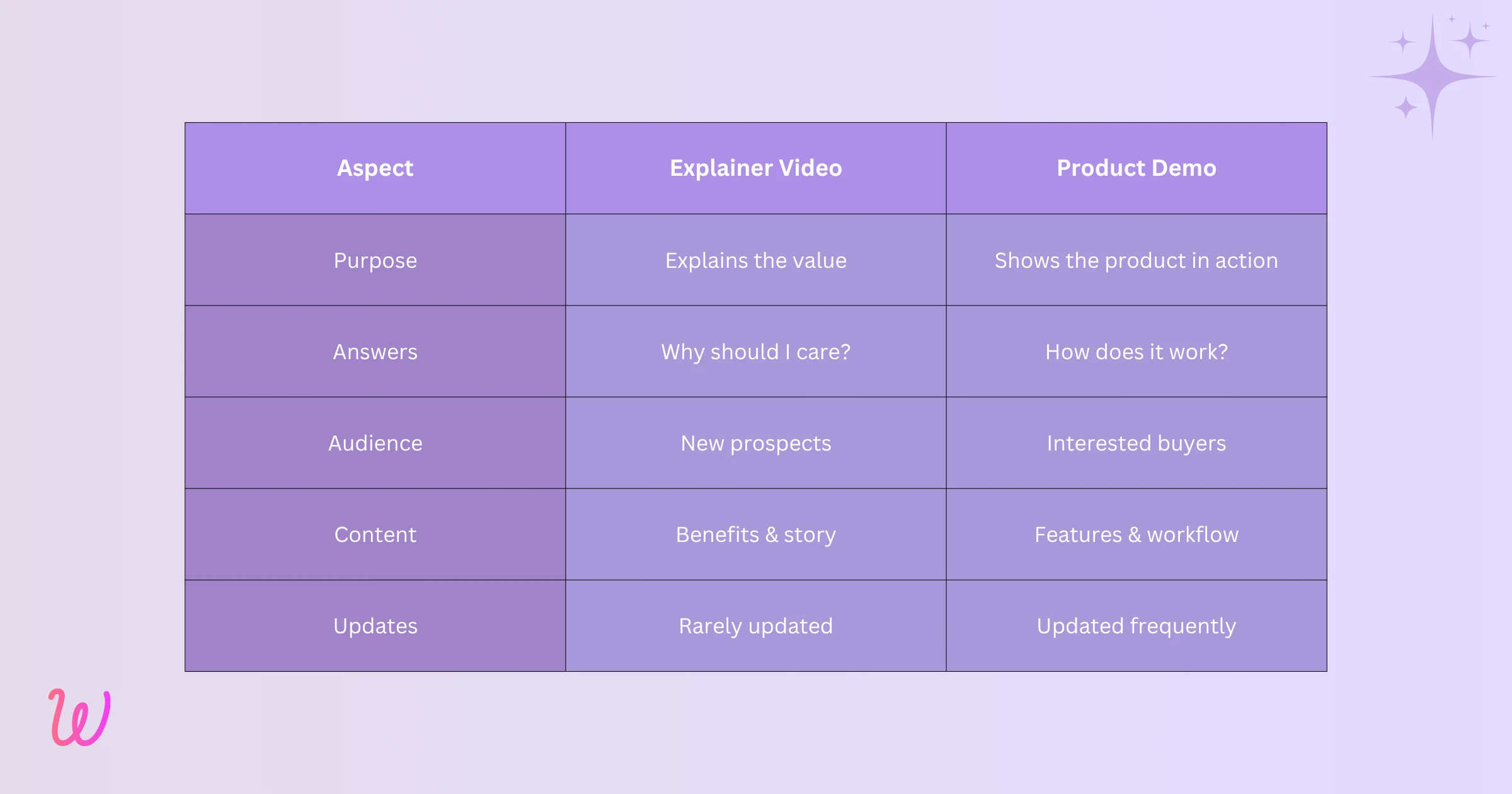
That distinction shapes how each video is produced and maintained. Explainer videos are usually built once and reused broadly across campaigns for months or years, since the underlying value proposition rarely changes. Product demos need far more frequent updates because software interfaces evolve constantly, and showing an outdated screen to a prospective buyer can create confusion instead of confidence. Understanding this trade-off matters because placing a product demo where an explainer video belongs, or the reverse, tends to increase bounce rates rather than reduce them.
When to use an explainer video
Reach for an explainer video when your audience does not yet understand your category or your product's core value proposition. In practice, that usually means one of the following situations applies.
- You are introducing a new or unfamiliar product category, and visitors need context before they can appreciate any specific feature.
- You are running top-of-funnel ad campaigns where attention spans are short and the video needs to hook a cold audience within the first few seconds.
- Your homepage or landing page needs a quick, visually engaging summary near the fold, before a visitor scrolls further or leaves.
- You are pitching investors, partners, or executive stakeholders who care about the big picture and the business case, not implementation details.
In each of these situations, showing a detailed interface walkthrough would be premature. The viewer has not yet decided they are interested, so a product demo simply hands them more information than they are ready to process.
When to use a product demo
A product demo becomes the right choice once a prospect already understands the problem and wants proof that your product can solve it for them specifically. This tends to show up in a handful of recurring scenarios.
- A visitor has reached your pricing page or a bottom-of-funnel landing page and is actively evaluating whether to sign up.
- A free-trial user needs guidance on how to complete a specific task inside the product without waiting for a support reply.
- A sales team wants to send a personalized walkthrough after a discovery call instead of scheduling a second live meeting.
- A support or customer success team wants to reduce repetitive questions by showing exactly how a feature works. Our guide on creating product demo videos for support teams goes deeper into building this kind of self-serve video library.
If you are deciding between building a self-serve demo library and continuing to rely on live sales calls, it is worth reading how SaaS startups are using tutorial videos to replace live demo calls, since the same reasoning applies to reducing repetitive, one-to-one demo work.
Can they work together in the same funnel?
Yes, and in most well-built video strategies, they do. A visitor might land on a homepage, watch a 90-second explainer video to understand what the product does, then click through to a feature page and watch a two-minute product demo of the specific workflow they care about. Treating explainer videos and product demos as sequential steps, rather than competing formats, is usually the more effective approach for moving someone from curiosity to conviction.
Our comparison of how-to videos versus live demos looks at this same trade-off from the angle of product adoption, and it is worth reading if you are mapping out which format belongs at each stage of your funnel.
A quick framework for deciding which one to make
If you are still unsure which format fits your current need, it helps to ask a few questions before writing a script or picking up a screen recorder.
- Does the viewer already know what your product category is? If not, start with an explainer video.
- Is this video meant to be watched by a cold audience with no prior context, such as an ad or a homepage hero section? Favor an explainer video.
- Has the viewer already expressed intent, such as starting a trial, requesting a demo, or opening a support ticket? A product demo will serve them better.
- Will this content need to be updated every time the interface changes? If yes, plan for a modular product demo library rather than a single long video.
None of these questions has a universally correct answer. A low-cost, self-serve product may lean heavily on product demos throughout the funnel, while a complex, high-touch enterprise sale may rely on an explainer video early and a guided demo later. What matters is making the choice deliberately, based on where the viewer is in their decision, rather than defaulting to whichever video already exists.
How WowTo fits into this picture
Building both formats well used to require very different skill sets: animators for explainer videos, and separate screen-recording software for demos. WowTo removes that split. Here is how it handles each part of the workflow, whichever format you are producing.
One editor for explainer-style and demo-style videos
WowTo lets you record a screen walkthrough, upload existing slides, or combine both inside the same browser-based editor. Whether you are building a 90-second explainer for a landing page or a detailed step-by-step demo for a support article, you are working in one tool instead of switching between separate software for each format.
AI voiceover in more than 20 languages
Instead of hiring voice talent for every language your audience speaks, WowTo generates natural-sounding AI voiceover from a script in minutes, with over 300 voices across 20-plus languages. This matters for both formats: a global explainer video and a localized product demo can both be produced from the same source script.
Easy updates without re-recording
When a feature changes, you can swap out a single clip or edit the script for that one step, rather than re-recording an entire product demo from scratch. Explainer videos, which change far less often, can stay untouched for months while your demo library stays current.
A searchable video knowledge base
Once your videos are ready, WowTo lets you host them in a branded, searchable video knowledge base on your own domain, so explainer content and detailed demos can live side by side and be organized by funnel stage, feature, or use case.
Conclusion
Explainer videos and product demos are not competing formats. They are built for different stages of the same journey. Use an explainer video when you need to build awareness and communicate value quickly to someone who does not yet know your product. Use a product demo when a prospect or customer already understands the problem and needs proof that your product solves it for them specifically. Most funnels benefit from both, placed deliberately rather than interchangeably.
If you are ready to start creating either format without hiring a production team, you can sign up for WowTo for free and start building your video library today.
