Why AI-Voiced Videos Outperform Silent Screen Recordings for Comprehension
Imagine opening a help video, hitting play, and watching someone click through a product — in total silence. No explanation, no context, just a cursor moving across the screen. You wait, hoping something will click. It doesn't.
This is the reality for millions of users encountering silent screen recordings every day. And it's quietly costing companies and customers.
According to Nielsen Norman Group, users who watch narrated video tutorials demonstrate higher task completion rates than those relying on silent recordings or text-only instructions. AI-voiced video tutorials give you both — at scale, without a recording studio, and without hiring a voiceover artist for every update.
This post breaks down exactly why AI voice-over transforms screen recordings from passive slideshows into comprehension engines — and how WowTo makes it easy to get there.
The comprehension gap: why silence fails in video tutorials
When someone watches a screen recording, they're doing two things simultaneously: tracking the cursor and trying to figure out what it means. Without narration, all the cognitive work falls on the viewer. They have to interpret the action, guess the purpose, and connect the steps — all at once.
This is what cognitive scientists call the split-attention effect. When related information is presented in separate, uncoordinated channels (such as a visual and a text caption), learners must mentally integrate them, which increases cognitive load and reduces comprehension.
A narrated tutorial solves this. The voice guides attention, provides context at exactly the right moment, and reduces the mental effort required to understand what's happening. The screen shows what is happening; the voice explains why and what to do next.
Studies in educational psychology consistently show that narrated multimedia instruction produces significantly better learning outcomes than equivalent instruction with on-screen text alone. This is the foundation of Mayer's Cognitive Theory of Multimedia Learning — and it directly explains why silent screen recordings underperform.
5 reasons AI voice over improves comprehension in screen recordings
1. Dual-channel learning: visuals + audio work together
The human brain processes visual and auditory information through separate cognitive channels. When a screen recording pairs what's happening on screen with a synchronized spoken explanation, both channels are engaged simultaneously — without overloading either one.
Silent recordings force everything through the visual channel. Text captions help, but they compete for the same visual attention as the screen content itself. AI voice over sidesteps this entirely: the explanation comes through audio while the visual channel stays dedicated to showing the workflow. The result is faster comprehension and better retention.
This is why narrated video tutorials produce higher task completion rates among users. They're not just easier to follow — they're cognitively better suited for learning procedural steps.
2. Context arrives at the right moment
In a silent screen recording, a click happens — and then the screen changes. The viewer sees the outcome but doesn't know why the step was taken, what to look for, or what it means for the next action. They're watching a sequence of events, not understanding a process.
AI voice-over synchronizes the explanation with the action. As the cursor moves to a button, the narration says, "Click the settings icon in the top right — this opens your account preferences." The viewer knows where to look, what they're about to see, and why it matters. That contextual layering is what converts a passive viewer into an active learner.
For software tutorials and video tutorials that walk users through multi-step processes, this timing matters enormously. One misunderstood step early in a tutorial confuses every step that follows.
3. Voice signals tone, urgency, and importance
Text on a screen is flat. A human voice — even an AI voice — carries emphasis, pacing, and tone. When a narrator slows down before a critical step, pauses before an important action, or emphasizes a key phrase, those cues signal to the viewer that this moment requires attention.
Silent captions can't do this. They show up and disappear at the same pace regardless of whether the step is routine or critical. AI voice over introduces the natural rhythm of instruction — the same rhythm a knowledgeable colleague would use when walking you through something in person.
This matters particularly in video tutorials for support teams, where some steps are simple, and others are high-stakes. Tone and pacing help viewers self-calibrate their attention.
4. Narrated videos hold attention longer
Engagement is a prerequisite for comprehension. If a viewer drops off before a tutorial is complete, the quality of the content doesn't matter. Silent screen recordings have a well-documented engagement problem: without audio stimulation, attention drifts.
Wistia's video engagement research consistently shows that narrated videos retain viewers significantly longer than silent alternatives, particularly in the critical first 30 seconds. Once a viewer disengages and scrubs forward — or abandons the video entirely — comprehension drops sharply.
AI voice-over keeps the viewer anchored. The narration creates a sense of forward momentum, signaling that something useful is about to be said. Viewers stay because the experience feels active, not passive.
5. Accessibility expands your comprehension reach
Not every user who watches your screen recording is a native speaker of the language your captions are written in. Not every user has the visual acuity to read small on-screen text annotations. Not every user is watching in an environment where they can read carefully.
AI voice-over dramatically expands the number of people who can actually comprehend your content. And when combined with auto-generated subtitles — a standard feature in tools like WowTo — you serve multiple audiences simultaneously: those who prefer audio, those who prefer text, and those who need both.
This is directly relevant to teams creating support content for global users. If you're already thinking about reaching international audiences, multilingual support videos with AI voices take this a step further — covering how to localize narrated videos into 20+ languages without a production team.
Why silent screen recordings became the default — and why that's changing
Silent screen recordings became popular because they were easy. Open a screen recorder, hit record, export, and share. No script, no microphone, no editing audio. For internal documentation, they worked well enough when the viewer already had context.
But as video tutorials shifted from internal workarounds to the primary customer-facing support channel, "good enough" stopped being good enough.
The friction points are well understood by anyone who's managed a support team:
- Users watch the silent recording, don't fully follow along, and open a ticket anyway
- The recording becomes outdated, but nobody knows who recorded the original or how to re-record it with consistent quality
- International users can't follow text annotations in their non-native language
- There's no consistent tone, pacing, or structure across videos made by different team members
AI voice-over solves each of these. It brings consistency to narration quality, makes updates as simple as editing a script and regenerating audio, and scales across languages without coordination overhead.
For teams looking to eliminate the common failure modes, top mistakes to avoid while recording your screen is a useful companion to this post, covering the recording-side issues that undermine even well-narrated tutorials.
How WowTo brings AI voice over to screen recordings without friction
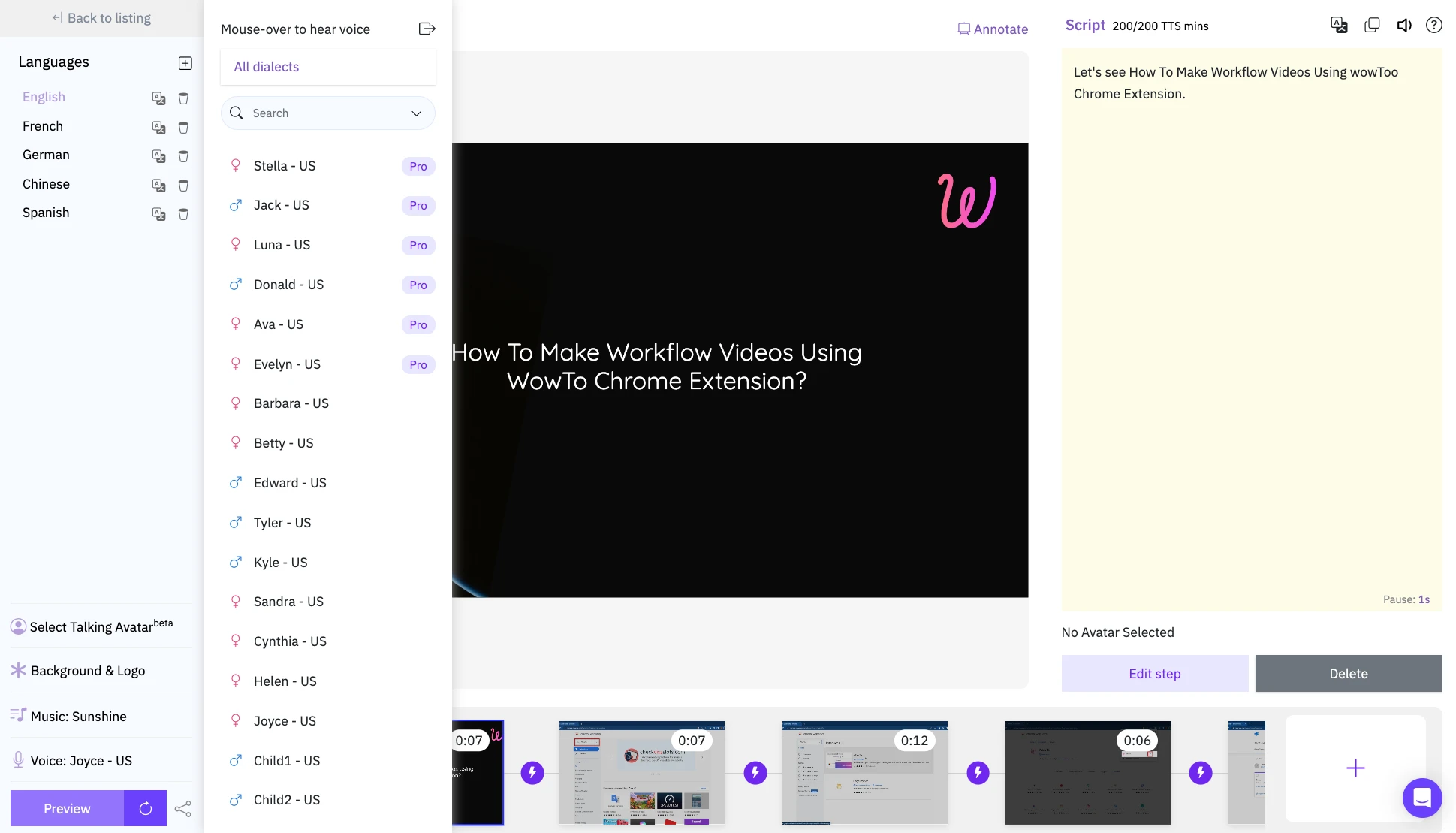
WowTo is built specifically for teams that need to create high-quality, narrated screen recording tutorials — without video production experience or a studio setup. That's all — capture your workflow with WowTo's Chrome extension, add a script, pick from 300+ AI voices, and your narrated tutorial is ready to embed, host, or share. The entire process can be completed by a single team member, with no video editing software, voiceover talent, or audio engineering involved. Your video tutorials also contribute to knowledge base SEO when hosted under your domain — making every narrated video an asset that works on multiple fronts.
Measuring the impact: what narrated tutorials change in practice
The comprehension benefits of AI voice-over aren't just theoretical. Teams that switch from silent screen recordings to narrated tutorials typically see measurable shifts in three areas:
- Support ticket volume. When users can follow a tutorial completely on the first watch, they resolve their own issues rather than opening tickets. This is the most direct signal that comprehension has improved. Reducing customer support tickets with video tutorials goes deep into the operational mechanics of this.
- Onboarding completion rates. Narrated onboarding videos correlate with higher feature adoption and faster time-to-value, because users actually complete and understand them. Silent recordings tend to be skimmed or abandoned, giving users the impression they understand something they haven't actually followed. The use of videos in SaaS customer onboarding covers why this distinction matters so much in the first 30 days.
- Video engagement metrics. Watch time, completion rate, and replay rate all tend to improve with narrated content — giving your team reliable data on which tutorials are performing and which need revision. WowTo's analytics make it straightforward to track these signals by video, so your team can iterate based on what's actually working.
Conclusion
Silent screen recordings are a workaround. They capture what happens on a screen but leave the hardest part — understanding it — entirely to the viewer.
AI voice over closes that gap. By engaging both the visual and auditory processing channels simultaneously, narrated video tutorials reduce cognitive load, improve comprehension, hold attention longer, and serve broader audiences. The science is clear, the data support it, and the tools to do it at scale now exist without a studio, a production team, or a localization budget.
If your current help center or onboarding library is built on silent recordings, the upgrade is simpler than you might think.
Start creating narrated video tutorials with WowTo today. 👉 Sign up free at app.wowto.ai
