How to Organize an Internal Knowledge Base for Faster Search
Most companies build an internal knowledge base with good intentions and then watch it turn into digital clutter within a year. According to IDC research — cited by sources including Laminin Solutions — knowledge workers spend roughly 2.5 hours a day, or close to 30 percent of the workday, searching for information they should already be able to find in seconds. That gap between having documentation and being able to locate it is exactly what proper knowledge base organization is meant to close. Teams building this kind of company knowledge base today are also using tools such as WowTo to bring video into the mix alongside text, so employees can watch a process rather than just read about it. This guide breaks down how to organize an internal knowledge base so that search gets faster as your company grows, not slower.
What makes an internal knowledge base hard to search
A company knowledge base rarely fails because of missing content. It fails because content is scattered. New pages get added ad hoc, different teams create parallel documents on the same topic, and naming conventions drift from page to page. Over time, an internal wiki that started simple becomes a pile of similarly titled articles, outdated screenshots, and folders that only made sense to whoever created them.

The real issue is retrieval, not volume. Enterprise knowledge management only works when the underlying document organization is built to support search rather than just storage. Before adding more articles, it helps to look honestly at how your existing internal documentation is structured, tagged, and connected — because a searchable knowledge base is designed on purpose, not accumulated by accident.
Categorize content before you build folders
Before creating a single folder, list out the categories your team actually searches by: HR policies, IT setup, product documentation, sales enablement, compliance, and so on. This list becomes the backbone of your knowledge base organization, and it should come before any software decision or folder tree.
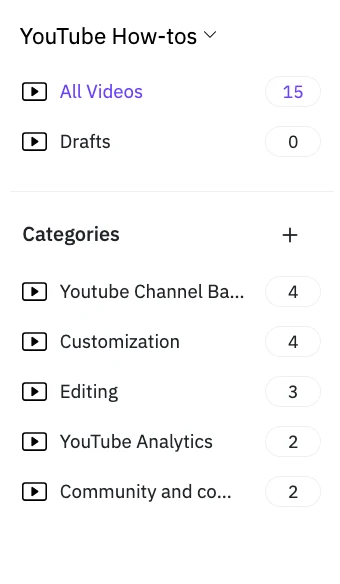
With WowTo, you can decide how to categorize articles in an internal knowledge base, sort by task and audience rather than by org chart. A support agent troubleshooting a login issue and a new hire finishing onboarding are both looking for a "how do I" answer, not a department name. Group content the way people actually ask questions, then map ownership underneath that structure instead of on top of it. This single shift is usually the difference between an internal knowledge base people avoid and one they rely on daily.
Design a folder structure people can predict
Good knowledge base folder structure best practices come down to predictability. If an employee can guess where an article should live before they search for it, your structure is working. A dependable approach is to keep folder depth shallow — no more than three levels — and to name top-level folders after outcomes ("Getting paid," "Setting up a laptop") rather than internal team labels that only make sense to the people who built them.
This is one of the more overlooked tips for organizing internal documentation: consistency matters more than cleverness. A slightly imperfect structure that stays the same for a year beats a perfect structure that gets reorganized every quarter, because employees build search habits around whatever exists, and every reorganization resets that habit to zero.
- Name folders after outcomes or tasks, not internal team or tool names.
- Cap folder depth at three levels so nothing gets buried past a couple of clicks.
- Give each topic one home instead of mirroring it under multiple parent categories.
- Leave room for categories that don't exist yet, instead of forcing new topics into the closest existing folder.
Standardize naming, titles, and tags
Two articles titled "Expense process" and "How to submit expenses" will both exist in most knowledge bases, and search results will show both, confusing whoever's looking. A shared naming convention — for example, always leading with a verb for process articles ("Submit," "Set up," "Request") — removes this duplication at the source.
Tags matter just as much as titles. Add a small, controlled set of tags (by team, by product area, by document type) instead of letting contributors invent new ones freely. A searchable knowledge base depends on this kind of internal documentation hygiene far more than on which platform you use to host it.
Give your employee knowledge base a clear hierarchy
Once categories and naming are settled, build the hierarchy top-down: broad categories, then subcategories, then individual articles. A well-structured employee knowledge base usually has no more than five or six top-level categories, since anything wider forces people to guess which one applies to their question.
This hierarchy has to reflect real usage rather than the org chart. Onboarding content, in particular, deserves its own top-level category rather than sitting buried under HR, since it's one of the highest-traffic sections in almost every employee knowledge base. Teams that treat onboarding as a first-class category tend to see fewer repeat questions to managers and IT in the first few weeks of a new hire's tenure.
Add metadata so search does the heavy lifting
A folder structure only helps browsing; metadata is what improves employee access to internal documentation through search bars, which in turn reduces repeat support tickets that stem from people not finding what already exists. Attach consistent metadata to every article — last updated date, owner, product area, article type — and expose it as filters wherever your search tool allows it.
This is also where document organization pays off technically. Search tools rank and filter results based on structured fields, not on how neatly a folder looks. A knowledge base with strong metadata will consistently outperform a knowledge base with more content but no structured tagging behind it.
It also helps to standardize a small set of required fields — owner, category, product area, and last-reviewed date — across every article template so nothing gets published without them. When these fields are optional, most contributors skip them under deadline pressure, and the search experience quietly degrades article by article until someone notices employees can no longer find things that clearly exist somewhere in the system.
Write one article per topic, not one per department
Long, multi-topic articles are one of the most common reasons internal documentation is hard to search. If an article covers five loosely related questions, it will rank for none of them clearly, and it becomes difficult to update without breaking something else on the page.
Split content into single-topic articles with a specific, literal title that matches how someone would phrase the question. This single practice, more than any tool or platform, tends to be the fastest way to make a knowledge base easy to search, because search engines and internal search bars alike reward specificity over breadth.
Assign owners and set review cycles
Knowledge management strategies for growing teams eventually have to deal with decay: articles written for last year's process, screenshots of a product that has since changed, policies that were updated in a meeting nobody documented. Assign a named owner to each category, not just each article, so there's accountability when content drifts out of date.
Set a recurring review cycle — quarterly for fast-changing categories like product documentation, annually for stable ones like company policy. As teams and content volume grow, this becomes especially important; see our guide on how to scale your video knowledge base as your company grows for a closer look at keeping structure intact through that growth instead of rebuilding it from scratch every time headcount doubles.
Let search analytics show you what's missing
Most knowledge base platforms like WowTo log what people search for, including the queries that return no results. This data is one of the most reliable ways to know how to improve internal knowledge base search, because it shows the exact gap between what employees are asking and what actually exists.
Review this list monthly and treat it as a content backlog. If the same query shows up repeatedly with no matching article, that is a clear signal of what to write next — a far more reliable prioritization method than guessing which topics matter most.
It's worth paying attention to near-miss searches too — cases where an article exists but didn't surface because the title or tags didn't match how the query was phrased. These are usually the fastest fixes available, since they need a title or tag adjustment rather than new content, and they compound over time as more employees phrase the same question the same unmatched way.
Where video fits into a searchable knowledge base
Text-only documentation works well for policies and reference material, but process-heavy topics — software steps, equipment setup, troubleshooting flows — are often easier to follow as a video knowledge base than as a wall of numbered steps and screenshots. This is the gap WowTo is generally built around: it lets teams turn existing processes into short how-to videos with AI voiceover, including turning SOPs into watchable video content, organize them using the same category and tagging structure covered above, and host them in a searchable help center that sits alongside or inside the rest of the company knowledge base. Used this way, video becomes another well-organized content type rather than a separate, disconnected system employees have to search twice.
Conclusion
Organizing an internal knowledge base for faster search isn't about switching tools every year — it's about getting categorization, naming, hierarchy, metadata, and ownership right, and then protecting that structure as content grows. Get those fundamentals in place first, and search speed follows naturally, regardless of which platform hosts the content.
If part of that reorganization includes turning written processes into instructional video, sign up for WowTo to see how a video-friendly knowledge base fits into the structure you build.
